Notify Invoice Status
Send latest status of an invoice to a defined merchant endpoint. To be notified with the updated status, merchant will need to prepare the endpoint that accepts the following requirements.
POST/notificationUrl
Notes
- Secret key should be kept secure by the merchant to avoid alteration of data.
- It is encouraged to validate the payload first before saving the status.
- The merchant endpoint must return a 200 response for the request to be completed.
- For failed response, the notification will resend the request after the following intervals:
- 2nd call - 30 seconds
- 3rd call - 1 minute
- If all else fails, to resend the status manually, the invoice sync function must be triggered on the platform side.
Notify Invoice Status
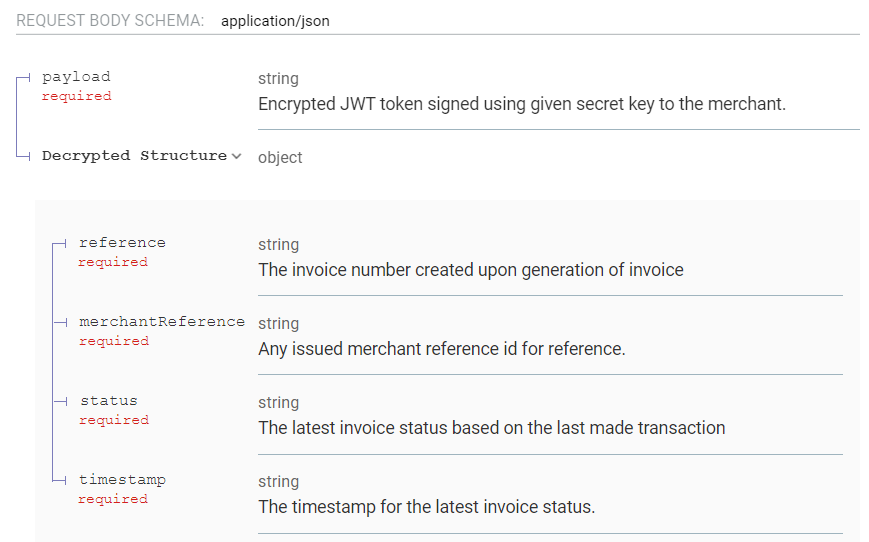
Request Samples
{
"payload": "eyJhbGciOiJIUzI1NiJ9.eyJyZWZlcmVuY2UiOiJJTlYtOTk5OTk5IiwibWVyY2hhbnRSZWZlcmVuY2UiOiJFU0FQSS0yMDIxMDEwNi0wMSIsInN 0YXR1cyI6IlBBSUQiLCJ0aW1lc3RhbXAiOiIyMDIxLTAxLTA2IDA0OjE4OjE4LjcxMSIsImlhdCI6MTYwOTkwNjY5OH0.78EsvsxSTXjghMW9CTTfcAhfw_Vg21 Aqbtig-1dQ3Gk"
}
{
    "reference": "INV-100001_TEST",
    "merchantReference": "ESAPI-20210106-01",
    "status": "PAID",
    "timestamp": "2021-01-06 04:18:18.711"
}
var settings = {
"url": "{host}",
"method": "POST",
"timeout": 0,
"headers": {
    "Content-Type": "application/json"
},
"data": JSON.stringify({<payload here>}),
};
$.ajax(settings).done(function (response) {
console.log(response);
});